RotaryAcceleratedEncoder — rotary encoder that speeds up
RotaryAcceleratedEncoder is for the same part as a RotaryEncoder: a knob
that turns forever, with a click at each step. It's for the knobs you crank a long way, such as
winding a latitude in on the navigation computer. Turn it slowly and each click nudges the
cockpit knob a small amount, just like a plain encoder. Spin it quickly and each click moves the
knob much further, so you get where you're going in a few turns instead of dozens.
It also ignores the odd backwards blip. Cheap or worn encoders sometimes send a single click the wrong way in the middle of a fast spin, and the board quietly drops it, so the cockpit knob keeps moving the way your hand is turning.
Not quite the right part?
- A knob you turn slowly, one click at a time? A plain RotaryEncoder is all you need.
- Does the cockpit knob have a pointer or marked positions? Use a selector switch instead: SwitchMultiPos for up to 12 positions, or AnalogMultiPos for more. A selector knows where it is pointing, so the sim matches it at startup; an encoder can't tell the sim where it is, only that it moved.
In your sketch
Pick the tab that matches the cockpit control. A selector only gets the filter; a knob gets both the filter and the speed-up.
const PinRef FREQ_A_PIN = PinRef(PA0);
const PinRef FREQ_B_PIN = PinRef(PA1);

OpenSkyhawk::RotaryAcceleratedEncoder freq1MHz(DCSIN_ARC51_FREQ_1MHZ, FREQ_A_PIN, FREQ_B_PIN,
    OpenSkyhawk::EncoderStepsPerDetent::Four, OpenSkyhawk::EncoderMode::Dir);
This turns the UHF radio's 1 MHz frequency wheel. A selector can only move one position
per click, so in DIR mode there is no speed-up, and what you gain is the filter. Use it if
a plain RotaryEncoder on a selector sometimes steps backwards while you turn.
const PinRef PPOS_LAT_A_PIN = PinRef(PA0);
const PinRef PPOS_LAT_B_PIN = PinRef(PA1);

OpenSkyhawk::RotaryAcceleratedEncoder pposLat(DCSIN_PPOS_LAT_KNB, PPOS_LAT_A_PIN, PPOS_LAT_B_PIN,
    OpenSkyhawk::EncoderStepsPerDetent::Four, 3200, 12800);
This turns the navigation computer's present-position latitude knob. The last two numbers
set how far each click moves it: 3200 for a normal click and 12800 for a fast one, so a
quick spin goes four times as far per click. A click counts as fast when it comes less than
about a fifth of a second after the one before. You always write both numbers, and you can
change either one to suit your knob.
Everything else in the line works exactly as it does for a
RotaryEncoder. The first two lines are
pin addresses for the encoder's A and B pins, followed by a name
you choose and the cockpit control. EncoderStepsPerDetent::Four matches the four changes most
encoders make per click; the RotaryEncoder page explains how to check yours.
Wiring
The wiring is exactly the same as for a RotaryEncoder:
- The middle pin, C, to GND.
- Pin A to one pin, and pin B to another.
- A 10 kΩ resistor from each of those two pins to 3.3V.
The resistors are pull-ups, which stop A and B flickering while they're open. Because this encoder is made for spinning quickly, a shift register is the best place for it if you have one.
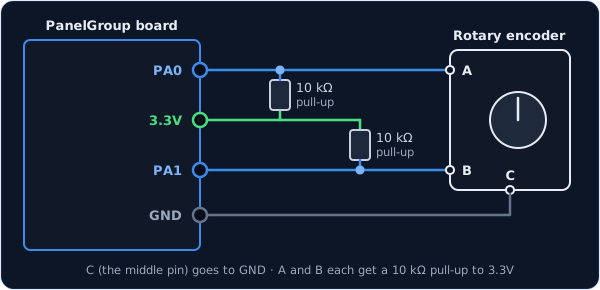
You can use any two free pins on the board, named as they're printed next to each pin.
const PinRef PPOS_LAT_A_PIN = PinRef(PA0);
const PinRef PPOS_LAT_B_PIN = PinRef(PA1);
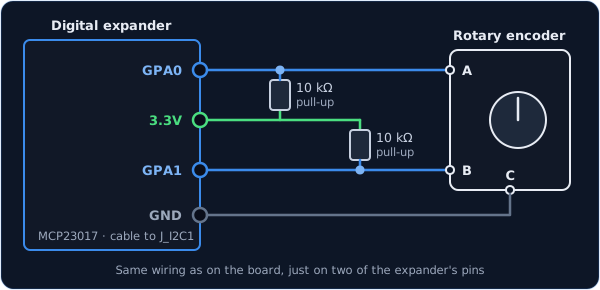
The wiring is the same, just on two of the expander's pins. Any pins work except GPA7
and GPB7, and the expander's two interrupt wires need to be connected so the board hears
about every click straight away.
const PinRef PPOS_LAT_A_PIN = PinRef(expander1, PORT_A, 0);   // GPA0
const PinRef PPOS_LAT_B_PIN = PinRef(expander1, PORT_A, 1);   // GPA1
Setting up a digital expander covers the lines your sketch needs for a first expander.
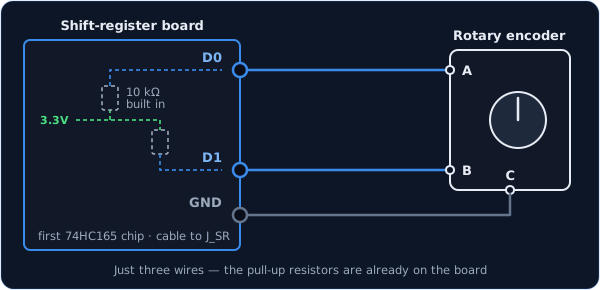
Only three wires are needed, because shift-register boards come with the pull-up resistors already fitted.
const PinRef PPOS_LAT_A_PIN = PinRef(ShiftBus1, 0, 0);   // first chip, pin 0
const PinRef PPOS_LAT_B_PIN = PinRef(ShiftBus1, 0, 1);   // first chip, pin 1
Also add this line to your platformio.ini, under build_flags:
-DSHIFTBUS_ISR_HZ=1000
The board then reads the shift registers a thousand times a second on a timer, so even a fast spin never loses a click. Setting up a shift-register chain explains how the chips are numbered.
Troubleshooting
When I reverse straight away, the first few clicks are ignored. That's the filter at work: a sudden change of direction mid-spin looks just like a blip. Pause for half a second before turning back and the very first click will count.
Spinning fast doesn't make the knob go any faster.
Check that the second number is bigger than the first, for example 3200, 12800. In DIR mode
there is no speed-up at all, and the first click after the board starts is always a normal one.
Even slow clicks move the knob too far. Lower the first number. Half the number moves the knob half as far per click, and you'll usually want to lower the second number to match.
It turns the wrong way, or doesn't respond at all. These have the same causes and fixes as on a plain encoder; see the RotaryEncoder troubleshooting.
Going further
A click is "fast" when it finishes less than 175 ms after the one before. There are only two speeds, normal and fast, rather than a gradual ramp.
The filter builds up momentum as you turn, up to four clicks' worth. While there is momentum, a change against it is dropped and only wears the momentum down, and after 500 ms without a click it resets to zero. That's why a deliberate reversal from rest always counts, while a reversal in the middle of a spin takes a moment to register.
Setting the second number to 0 turns the speed-up off and leaves only the filter, for a
knob that should never speed up.
Both behaviours match DCS-BIOS's RotaryAcceleratedEncoder, so if you're coming from
DCS-BIOS, the knob feels the way you're used to.
Every detail of the class is in the API reference.